Reverse engineering "Vlak" (1)
Intel 80286 registers and instructions; calculating a checksum

Miroslav Němeček is a Czech programmer legend. He wrote a file manager “DOS Manažer”, a full-fledged equivalent of the famous Norton Commander, which allowed him to start his own company. He wrote two programming languages for children: “Baltík” and “Petr”, various programs for DOS and Windows, and a few games, such as “Vlak” (train), “Mravenci” (ants), and “Třináct duchů” (thirteen ghosts). The games were published as freeware.
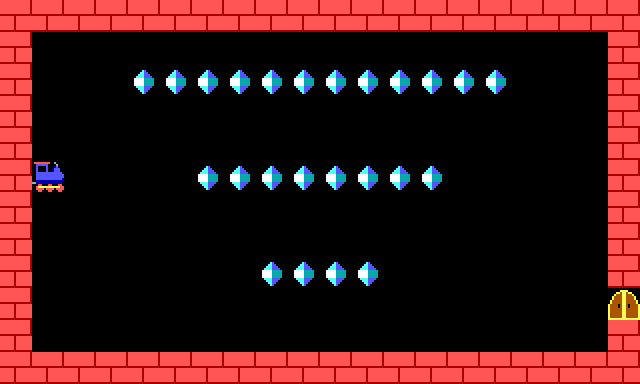
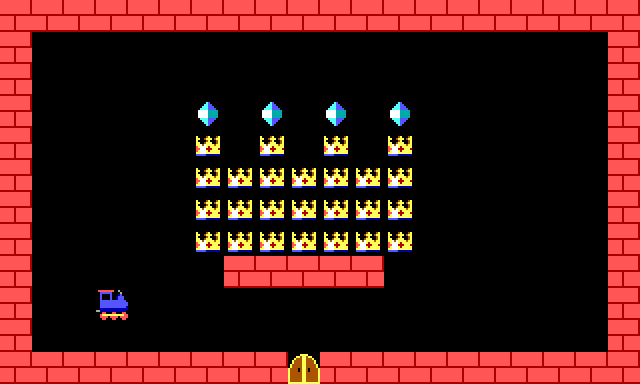
His most popular game “Vlak”, created in 1993, is a variant of the famous Snake game, but instead of a snake, the player navigates a train, and instead of generating apples at random positions to collect, the game has 50 puzzle levels of gradually increasing difficulty. Completing a level gives you a password, so you can later continue at the next level.
Version 1.0 consisted of a single VLAK.COM file, only 13154 bytes long. Easy to fit on a floppy disk, and fun to play. I think many people born in former Czechoslovakia would recognize the game.
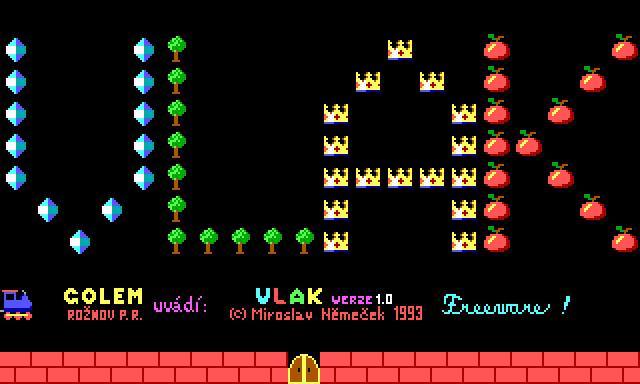
A few decades later, I found a large collection of DOS era games called eXoDOS. It contains over 7000 games, together with various DOS emulators configured to let you play the games out of the box. After playing a few games, I started wondering how difficult it would be to reverse engineer one of those old games using the modern tools. As a teenager, I didn’t have the skills, and as I grew older, the computer games I played became more complicated, and I had less time to play them. But perhaps if today I tried one of those old, simple games…
As I was looking for a sufficiently small game, I found “Vlak”, and it seemed like a perfect choice. A game I knew and liked, but never finished, so it simultaneously was familiar and had a few mysteries left. Old enough so that it probably didn’t contain anything too sophisticated.
Reading the binary code is challenging. But in this case it should be relatively short. A binary instruction of Intel 80286 processor (supported by the game) can be 1, 2, or 3 bytes long. And the 13 kilobytes of the game also include the graphics, levels, and passwords. So I expected a few thousand instructions at most. That felt doable.
If you are not familiar with programming in the assembly language, I will try to make the following text as simple as possible, but some familiarity with programming is necessary.
If you are familiar with modern programming languages, such as Python, some concepts will be similar, but the limitation will probably seem horrifying. When writing binary code, you are directly programming a CPU, a piece of hardware. The CPU comes with a limited set of commands (called instructions) and variables (called registers). It is hardware — you cannot carve in an extra variable just for your game. You have to use the existing ones, with generic names such as AX, BX, CX, DX, and you will be reusing them for various purposes all the time. Writing such code is a challenge. Reading it — without seeing the comments in the source code — is like solving a puzzle. You know what the individual instructions do, for example “mov cx, 0x19b1” stores a hexadecimal value 19b1 (that is 6577 in decimal) into the register CX. But what does the value mean? You will figure that out later, hopefully.
I hope you are familiar with the hexadecimal (and binary) numbers. I will use them a lot. I won’t even write the traditional “0x” prefix for hexadecimal values; from this point on, assume that any number written in this article is hexadecimal, unless explicitly told otherwise.
When the user starts the game, the contents of the VLAK.COM file are loaded in memory. Think of the memory as a large array of bytes. So, in addition to registers (the few variables existing in the processor), we also have one gigantic array. Each item in the array is indexed by two values, called “segment” and “offset”. It is actually a one-dimensional array; the actual index is calculated as 10×segment+offset (that is hexadecimal 10, i.e. decimal 16).1 So when the user starts the game, the operating system finds a sufficiently long block of continuous free memory starting at a multiple of 10. It sets all segment registers to point at that segment. It writes various metadata to the first 0100 bytes, and the contents of the VLAK.COM file to the following bytes. Then it starts the game at the address CS:0100.2
For example, suppose that you start a COM program, the beginning of the memory is used by DOS itself (maybe also some extra drivers and environmental variables), and the free memory starts… let’s say, at address 01dd0. DOS will set all segment registers (CS, DS, ES, SS) to 01dd, write the metadata to the memory between CS:0000 and CS:00ff, and the contents of the program to memory between CS:0100 and CS:ffff. Then it will start the program at CS:0100.
The beauty of this approach is that regardless of which place in memory your program was loaded to, it always starts at CS:0100 (which means 10×CS+0100). For different values of CS, of course, but most of the time you don’t need to care about that, because you usually don’t need to change CS if your entire program fits into one segment.
When we start VLAK.COM, the bytes from the file will be loaded at CS:0100.
0100 e9 c6 32 ad 72 1d bf c6 ...(Note: The first number is the memory address, what follows is the content of the memory.)
This is how the processor sees the code. The program starts at CS:0100, with byte “e9”. That is a processor instruction “jump”, meaning the program will continue at a different address. The address is provided in the following two bytes “c6” and “32”, and is interpreted like this:
The jump instruction at address 0100 was three bytes long (because an “e9” jump instruction is always three bytes long), so the natural place to continue would be at 0103. The following two numbers give us value 32c6 (the first byte + 100× the second byte), which is added to 0103, giving 33c9. So the instruction tells the processor to continue at address CS:33c9.
(Yay! The first three bytes were deciphered successfully. Only a few thousand more to go…)
To make this easier, people do not write and read binary code using hexadecimal numbers, but using short mnemonic codes, for example “jmp” for jump. This is called an assembly language; it is straightforward to translate to and from the binary code, but much easier to read for humans. The instruction, written in the assembly language, would look like this:
0100 jmp 33c9Okay, but what does it mean? I guess we will figure it out when we look at what happens at the address 33c9. Here it is:
33C9  push  ax
33CA  push  bx
33CB  push  cx
33CC  push  dx
33CD  push  si
33CE  push  di
33CF  pushf
To explain what this means, I need to explain the concept of stack, as it used in the binary code.
Sometimes you need to store a value from your register, because you will need it later, but right now you need to use the register for something else. (Remember, you only have a small number of registers.) As a general solution, you can’t store it at a predefined place in memory, because you don’t know which part of memory will your program be loaded in. And you can’t store it at a place that you will remember in another register, because what if you need to reuse that register, too? What if you need to reuse all the registers?
The solution is to have two special registers dedicated for the purpose of putting aside some values and retrieving them later. The registers are called SS (stack segment) and SP (stack pointer). Together they point at the place in memory where the last value was stored.
Suppose that you want to store the value of the register AX. The register AX is two bytes long. The command “push ax” will decrease the value of SP by two, and then store the two bytes of AX to memory addresses SS:SP and SS:SP+1. The opposite command “pop ax” will restore the value of AX from memory addresses SS:SP and SS:SP+1, and then increase SP by two.3
You usually don’t need to care about these technicalities; you only need to know that “push ax” saves the value of AX, and later “pop ax” restores it. If you save multiple values, you need to restore them in the opposite order, for example if you do “push ax; push bx”, you later need to do “pop bx; pop ax”. (First in, last out.) You need to retrieve all the values you have stored, or discard them by increasing SP explicitly; that way, one part of your program can call another part of your program without worrying that the other part will mess up the stack.
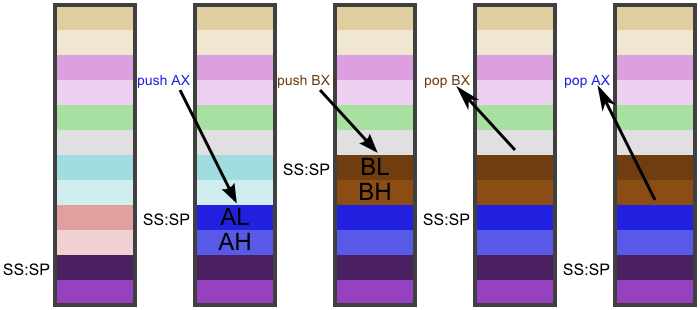
So, the first few instructions store the values of registers AX, BX, CX, DX, SI, DI. The last instruction “pushf” stores the value of flags. Flags are also variables of the processors, but if the registers are analogical to integer variables in a programming language, the flags are analogical to boolean variables. There are a few flags; the instruction “pushf” stores a 16-bit value containing all the flags, and some extra bits.
What does this all mean? Apparently, the program is going to use all the mentioned registers somehow, and afterwards it will restore them to their original values.
33D0  mov   di, 0100
33D3  mov   cx, 19b1
33D6  mov   si, di
33D8  mov   dx, cx
The “mov” instruction assigns (moves) the value of the second argument to the first argument. The same code written in Python and slightly refactored would look like this:
si = di = 0x0100  # 256 = the program starts here in memory
dx = cx = 0x19b1  # 6577 = size of the program in words (pairs of bytes)
The variables are initialized and here comes the algorithm:
33DA  cld
33DB  lodsw ax, [si]
33DC  rol   dx, 1
33DE  xor   dx, ax
33E0  loop  33db
This is fairly simple once you understand what all the individual instructions do.
Instruction “cld” clears the direction flag (sets the boolean value DF to false).
Instruction “lodsw” loads a word (two bytes) from memory address specified by DS:SI into register AX. Afterwards it increases (because DF is false; otherwise it would decrease) SI by two (so that it points to the next word, which could be loaded by another lodsw instruction).
We have not changed DS, so it contains the same value that DOS assigned to it after loading the program; which is the segment where the game is loaded. SI was initialized to 0100, which is the offset where the game is loaded. That means, DS:SI points to the start of the game. And we are going to read it, one word (two bytes) at a time.
Instruction “loop” decreases CX by one, and jumps to the specified address if CX ≠ 0. That allows us to create a loop that repeats CX times. CX was initialized to the size of the program in words (size in bytes divided by two). That means, we are going to repeat the loop for each word (pair of bytes) in the program.
Instruction “rol” rotates the bits in the register DX to the left by 1. Imagine a binary number, consisting on 16 digits which are either ones or zeroes. Take the leftmost digit, move all the remaining digits one position to the left, and put the original leftmost digits on the last place. For example, if the original number was 0111 0101 0011 0000, rotating it to the left by one gives us 1110 1010 0110 0000. Similarly, rotating 1110 1010 0110 0000 to the left by one gives us 1101 0100 1100 0001. An equivalent Python code would be:
dx = ((dx << 1) | (dx >> 15)) & 0xffffFinally, “xor” does an exclusive or operation on two binary numbers, bit by bit, where the result is 1 if the inputs were different (either 0 and 1 or 1 and 0), and the result is 0 if the inputs were the same (two 0s, or two 1s). For example, 0111 0101 0011 0000 xor 1110 1010 0110 0000 equals 1001 1111 0101 0000. The result is assigned to the first argument.
Now we see how this all connects. The instructions “cld”, “lodsw”, and “loop” create a loop over all words in the program, and the instructions “rol” and “xor” in the loop calculate some kind of checksum. An equivalent Python code would be:
program = [0xc6e9, 0xad32, 0x1d72, 0xc6bf, ...]  # contents of VLAK.COM as a list of words
dx = len(program)
for ax in program:
    dx = (((dx << 1) | (dx >> 15)) & 0xffff) ^ ax
Cool, we have calculated a checksum of the entire file VLAK.COM. What next?
33E2  jz   33f0
33E4  mov  dx, 3449
33E7  mov  ah, 09
33E9  int  21
33EB  mov  ax, 4cfe
33EE  int  21
If the checksum is equal to zero (the check passed), continue at CS:33f0.
Instruction “jz” means jump if zero. If what is zero? The result of the last calculation; in our case it would be the last “xor” instruction. After doing a mathematical operation, as a side effect the processor sets a zero flag (a boolean variable ZF) to true if the result was zero, or false if the result was nonzero. The flag can be later checked, or ignored.
Instruction “int” calls a so-called interrupt. You can imagine them as functions provided by the environment, but they have numbers instead of names. The function number 21 (hexadecimal) is DOS API. It does many different things, depending on the value of register AH. Specifically, for AH = 09 it prints a string, which starts at memory address DS:DX and is terminated by a “$” dollar character.
In this specific situation, the string at DS:DX contains a message “Program corrupted” (in Czech). DS still wasn’t changed; it contains the segment where the program was loaded.
For the next call, I need to explain the relation between the 16-bit and 8-bit registers of Intel 80286. The 16-bit registers AX, BX, CX, DX contain two bytes. Each of those bytes can be used as a separate 8-bit register. The two parts of AX are called AH and AL (high and low), the parts of BX are called BH and BL, and analogically CH and CL, DH and DL. For example, by assigning value 1234 to register AX, you have also assigned 12 to AH and 34 to AL. And if you later change AL to 89, the value of AX will become 1289.
So the second call to DOS API sets AX to 4cfe, that is AH to 4c and AL to fe. For AH = 4c the DOS API terminates the program, and returns AL as an error code. (By convention, 0 means no error, nonzero means error.) By calling this interrupt the programs terminates, i.e. no more instructions in the program will be executed.
Again, a Python analogy, although of course no one would actually do this in Python:
def dos_api(registers):
    if registers["ah"] == 0x09:
        print_dollar_terminated_string(segment=registers["ds"], offset=registers["dx"])
    if registers["ah"] == 0x4c:
        exit(registers["al"])
    # etc.

ERROR_MESSAGE = "Program corrupted !\n$"

dx = calculate_checksum(...)
if dx != 0:
    dos_api({"ah": 0x09, "ds": segment_of(ERROR_MESSAGE), "dx": offset_of(ERROR_MESSAGE)})
    dos_api({"ah": 0x4c, "al": 0xfe})
The program does a few more checks at this point, but I suspect that if this is your first article about reverse engineering DOS binaries, you are probably already tired. Let me give you a short summary, in case you decide to try it for yourself:4
The program checks whether the version of DOS is at least 3.0. (If not, the additional checks are skipped.) Then the program tries to find the VLAK.COM file on disk. The previous checksum was calculated from the program already loaded in memory, but we are suspicious about whether the data in memory actually match the original content on disk. We check the file length, and its first three bytes, reporting corruption if they don’t match. (If we can’t find the file, or can’t read its contents, the additional checks are skipped.)
Finally:
3432  cmp   [di + 1], 32c6
3437  jne   33e4
3439  mov   si, 33c6
343C  cld
343D  movsb es:[di], [si]
343E  movsw es:[di], [si]
The register DI was set to 0100 (the start of the program in memory) at the beginning of this code and hasn’t changed since then. The “cmp” instruction compares the two bytes at address DS:DI+1 and DS:DI+2 with c6 and 32; the following jump prints an error and terminates the program if they don’t match. (The first three bytes of the program are e9 c6 32 — the instruction to jump from the beginning of the program to the checksum calculation routine.)
Then it sets SI to 33c6, which is an address where the original first three bytes of the program are stored. (Because this entire checksum algorithm was added on top of an already existing program. And now we are going to restore the original program in the memory.) It clears the direction flag, and then moves three bytes (one byte and one word) from DS:33c6 to ES:0100. (Registers DS and ES still contain the segment where the program was loaded.)
And then…
343F  popf
3440  pop   di
3441  pop   si
3442  pop   dx
3443  pop   cx
3444  pop   bx
3445  pop   ax
3446  jmp   0100
…the program restores the original values of the registers it used, and jumps to the beginning at CS:0100, to start the original program.
Ah, what I wanted was to reverse engineer a game, but instead I just reverse engineered a checksum validator that was appended to the original game.5 The good news is that thanks to the knowledge I gained, I can now restore the original game using a short Python script:
with open('VLAK.COM', 'rb') as file:
    data = file.read()
memory = bytearray(0x0100) + data  # load
memory = memory[0:0x0100] + memory[0x33C6:0x33C9] + memory[0x0103:0x33C4]  # restore
data = memory[0x0100:]  # save
with open('VLAK1.COM', 'wb') as file:
    file.write(data)
Perhaps I will have better luck the next time. The good news is that out of the original 13154 bytes (decimal) there are only 12996 bytes left now.
This was called “real mode”; the only memory mode supported by the Intel 80286 processor. Later, it got more complicated.
This is how it works for the COM files. With EXE files, it is more complicated. On the other hand, the size of a COM file is limited to 64 kilobytes (decimal); the EXE files can be arbitrarily long.
This may sound weird the first time you hear it — why would adding more values decrease the address rather than increase it. But think about it this way:
There is a limited amount of memory. You load your programs and data from the beginning of the memory, going forward. And you push your data to stack from the end of the memory, going backward. You get flexibility on both ends, as opposed to having to split the memory in advance.
(And you hope that you have enough memory for these two to never meet, because otherwise one of them will overwrite the other, resulting in an unpredictable but usually catastrophic outcome. No, this is not a joke; it is a frequent problem called “stack overflow”. Sometimes malicious users can exploit it to overwrite the original code using specifically chosen values, to run their own program with the security permissions of the original program.)
To do all of this the way I did it, you need to obtain the game Vlak, and the dosbox-debug emulator. You can find both of them in the eXoDOS project, or you can download the game from the author’s repository, and dosbox-debug from the DOSBox web page.
And then you need to configure it. In case of using eXoDOS, it means replacing “dosbox.exe” with “dosbox-debug.exe” in the BAT file, and replacing “@vlak” with “debug VLAK.COM” in the dosbox.conf file. If you download them independently, you need to figure this out for yourself.
The checksum validator itself is a DOS product created by Miroslav Němeček. In the era before the internet, computer viruses typically spread from one computer to another by attaching themselves to other programs. When you copied the infected program to another computer and started it, it scanned the disk, infected other programs on the disk, and then started the original program. The purpose of the checksum validator is to detect this kind of modification and alert the user.